If you’ve spent any time field recording, you probably have had similar pain to me: Folders full of ZOOM0001.wav and TASCAM_2025-09-01.wav, with no clue what’s actually inside those files without clicking and listening. Months later, that recording of “birds at dawn” might as well be “busy airport.”
I got frustrated with this exact problem — so much so that I ended up writing FieldLog. I was kind of jealous of my Fuji camera’s GPS tagged photos with their full EXIF data. Along the way, I’ve learned a lot about naming conventions, metadata, and why it matters, but I still failed at keeping a consistent notebook or pre-recording audio log.
This post is a practical breakdown of where I’m at with organizing and tagging field recordings.
Why Metadata Matters
Every recording is more than just audio. It has context:
- Where it was captured (city, forest, rooftop, airport, theme park, farm)
- When it was captured (time of day, season, even and especially weather)
- How it was captured (mics, rigs, gain settings, patterns)
- Why it was captured (ambience, sound library, a test run)
Without that information, a sound library quickly becomes a junk drawer full of those convention stress balls and empty lighters. With it, things become searchable, reusable, and generate so much less frustration.
Common Approaches
1) Handwritten notebooks
Why it’s good: Having a small notebook on your person is a solid habit anyway. It’s flexible, battery-proof, and fast. It can contain as much or as little information as possible.
Where it breaks: It can contain as much or as little information as possible (oh, you forgot to note the weather?) Notebooks don’t sync with files or libraries. Page numbers don’t map to filenames. Later, I’m triangulating timestamps and memory. If the notebook isn’t with me, or I let it get wet in my back pocket, well there goes that.

2) Pre-roll voice slates (speaking into the mic)
Why it’s good: the slate is literally attached to the audio; I can say, “LA River underpass, spaced Clippy pair, 80ish degrees, Take 2.”
Where it breaks: pre-roll contaminates ambiences. I either leave the announcement in (and ruin the take) or trim it off (and lose the metadata while editing). It’s also slow when I’m doing multiple mic positions, lots of start/stop just to announce details. It kills all chances at spontaneous or stealth recording.
3) Recorder text notes / file name edits
Why it’s good: some recorders let you add notes or rename files on-device, like my F6.
Where it breaks: tiny screens, clunky input, and limited characters. Some recorders let you attach and external keyboard, but that’s more stuff. Also, these notes aren’t standardized and don’t always make it into DAWs or library tools.
Maybe one day the bluetooth apps will start adding more of this feature set in.
4) Phone notes or separate voice memos
Why it’s good: fast, searchable, photo-friendly. I can snap a rig photo and type a paragraph.
Where it breaks: the data is siloed. Photos and notes live in a different app than the audio. When I import files months later, the connection is gone unless I manually line up timestamps. Android doesn’t have a consistently backed up default notes app like iOS. I’ve bounced too often between throwing something in an email draft or using OneNote
5) “I’ll remember later” (aka future-me will figure it out)
This is the one that I tend to go to by default, and how I wound up here in the first place.
Why it’s good: zero overhead.
Where it breaks: future-Houstin has no idea what “ZOOM0017.wav” is, without committing the 10 or 20 minutes to listen to it. Usually passable for basic sound library stuff, but not for ambiances.
Best Practices That Work for Me
Here’s what I’ve landed on after a lot of trial and error:
Consistentish naming convention
Example:2025-09-01_LA_ForestAmbience_Take03.wav
Date + location + subject + take number. Enough to jog my memory even outside an app.UCS Tags (Universal Category System)
It’s becoming the standard in sound libraries. Using tags likeAMB_ForestorFOOT_Gravelmakes files portable across different workflows.Capture context at the time
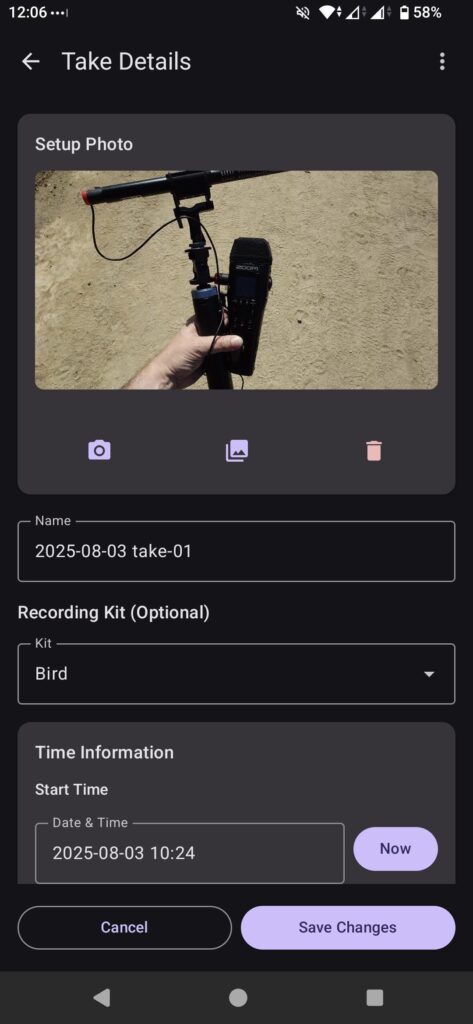
GPS coordinates, weather, a quick setup photo, or even just a short note about what I was aiming for. You think you’ll remember later. You won’t.
How Made-For-Purpose Tools Can Help
You can do all this with spreadsheets/text files and folders and that’s what I used for the first 10 years in field recording as a hobby. But it’s clunky, especially when on longer travel. That’s where the basic feature set of FieldLog came from. An single place where I can log takes, kits, notes, and even automatically pull weather data at the time of recording.
For me, the goal is simple: spend less time wrangling filenames and more time enjoying where I was at.
Wrapping Up
If you want your recordings to actually last beyond a single project, they need some form of context. A good naming convention plus solid metadata means you can find that perfect ambience or foley effect from that creepy old hotel in Colorado Springs when you think of it, instead of hunting through old folders wondering if you just made it up.
That’s the whole reason I made FieldLog. A busy travel season made me forget all those important things I wanted to remember. I’ve been using the app for a few months now, so hopefully someone else finds it just as helpful.