

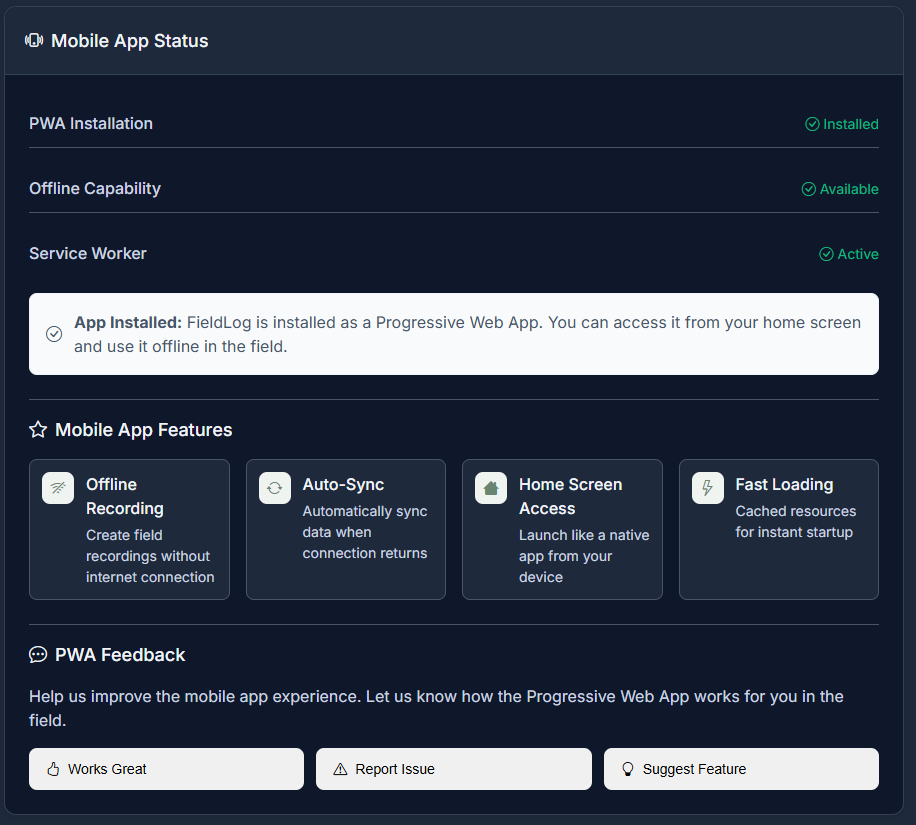
I am excited to announce that FieldLog now supports Progressive Web App (PWA) technology, bringing you a mobile app experience without needing to download anything from the App Store. While not a complete replacement for a native app, it gives you the most important features to you regardless of connection status!
This new feature is hot off the presses, so please reach out if you are having any issues!
What is a Progressive Web App (PWA)?
A Progressive Web App is a web application that uses modern web technologies to deliver an app-like experience directly through your browser. Think of it as the best of both worlds: the accessibility of a website with the functionality and feel of a native mobile app.
PWAs offer several key advantages:
- Works offline – Continue using the app even without internet connection
- App-like interface – Full-screen experience that feels like a native app
- Install to home screen – Add an icon to your phone’s home screen
- Fast loading – Cached content loads instantly
- Push notifications – Stay updated even when the app isn’t open
- No app store required – Access immediately through your browser
How FieldLog’s PWA Benefits Users
1. Offline Take Recording
Record your take metadata even in areas with no cell service. Your takes are saved locally and automatically sync when you’re back online.
2. Instant Access
No need to wait for app store approvals or updates. Access the latest FieldLog features immediately through your browser.
3. Cross-Platform Compatibility
Works on any device with a modern browser – iPhone, Android, tablet, or desktop.
4. Reduced Storage
Uses significantly less device storage compared to native apps while providing similar functionality.
How to Install FieldLog PWA on Your Device
For iPhone Users (iOS Safari):
- Open Safari and navigate to fieldlog.net
- Log in to your FieldLog account
- Tap the Share button (square with arrow pointing up) at the bottom of the screen
- Scroll down and tap “Add to Home Screen”
- Name your app (default: “FieldLog”) and tap “Add”
- Find the FieldLog icon on your home screen – it now works like a native app!
For Android Users (Chrome):
- Open Chrome and go to fieldlog.net
- Sign in to your account
- Tap the three-dot menu in the top right corner
- Select “Add to Home screen” from the menu
- Choose a name for the app and tap “Add”
- Confirm by tapping “Add” again
- Launch from your home screen – enjoy the full-screen app experience!
Alternative Installation Method:
Most modern browsers will automatically show an “Install App” prompt when you visit FieldLog. Simply tap “Install” when this notification appears.

Using FieldLog Offline
Once installed, FieldLog’s PWA provides robust offline functionality:
Recording Takes Offline:
- Open the FieldLog PWA (even without internet)
- Navigate to “New Take”
- Fill in all your metadata details – location, gear, notes
- Add photos (they’ll be stored locally)
- Save your take – it’s stored on your device
- When you’re back online, takes automatically sync to your account
Viewing Past Takes:
- Recently viewed takes are cached and available offline
- Search through your cached hunting history
- View photos and details even without connection
Map Integration:
- Your current location works offline using device GPS
- Previously loaded map areas remain accessible
- Weather data shows last known conditions, and will update so long as you sync within 24 hours
Why PWA is Perfect Until I Develop an iOS App
Immediate Availability
Rather than waiting months for a native iOS app to be developed, tested, and approved through app stores, FieldLog’s PWA gives you mobile functionality right now.
Feature Parity
The PWA includes nearly all desktop features:
- Complete take management
- Photo uploads and organization
- Gear tracking and management
- Weather integration
- UCS tag system
- Map integration with GPS
Continuous Updates
Unlike native apps that require store approval for updates, PWA features and fixes are deployed immediately. You always have the latest version.
Testing Ground
The PWA serves as an excellent testing platform for mobile workflows. User feedback helps us refine the mobile experience before investing in native app development.
The Future of FieldLog Mobile
While our PWA provides excellent mobile functionality today, we’re still planning dedicated native apps for iOS and Android. The PWA serves as a bridge, ensuring you have full mobile access to FieldLog while we develop platform-specific features like:
- Enhanced camera integration
- Native sharing capabilities
- Advanced offline mapping
- Platform-specific UI optimizations